Jump to navigation

Our D’source
  • Log in
  • |
  • Sign up

  • Create New Content
    • Design Course
    • Design Resource/Reference
    • Design Case Study
    • Design Showcase/Studio
    • Create Gallery
    • Open Design

Search form

Animation Design Communication Design Design Fundamentals Interaction Design Product Design Tools for Design Open Design

Details of contributing to the D’source project:

Dsource project seeks contributions to its content from academicians and researchers.

You could send the content to us as a PDF (with referenced images and text) to dsource.in[at]gmail.com or by uploading the content at https://ourdsource.in/

The content on Dsource is part of the Open Design initiative and is licenced under Creative Commons Attribution-NonCommercial-ShareAlike license.

D’source Courses:
The courses could be related to Animation, Communication, Interaction, Product and vehicle Design (including Fundamentals of Design)
The following format is suggested for Course:
a. Introduction to the subject.
b. Notes in brief on the subject with illustrations/images/video. This could include sub- categories.
c. Exercises for design students on the subject.
d. Examples of solved design exercise.
e. Full Reference (Author, Title, Publication, Year, Place) for the subject.
The contributed course will be open to public after it has been verified by the D’source team.
Examples/References: dsource.in/course/product-drawing

D'source Resources:
Resources could be about crafts, products, artifacts, celebrations and festivals connected with India. The documentation of resources should be based on notes in brief supported by photo and/or video.
The following format is suggested for Resource:
a. Introduction to the resource.
b. Environment – the location, people, surroundings, etc.
c. Making process – from start to the final product.
d. Materials and tools used in the process.
e. Variations – different themes, different products, etc.
f. Full Reference (Author, Title, Publication, Year, Place) for the subject.
The contributed resource will be open to public after it has been verified by the D’source team.
Examples/References:
dsource.in/resource/dhokra-shilp,
dsource.in/resource/kites

D'source Case Studies:
Case studies could be about product design, automobile design, animation design, communication design, Interaction Design, etc. The documentation of case studies should highlight the process of design.
The following format is suggested for Case Studies:
a. Introduction to the Case Study.
b. Process and methodology.
c. Documentation of design process – from start to the final product (problem identification, primary and secondary research, analysis and insights, concepts and ideation, prototyping, final concept, details/specification, user testing and feedback.)
d. Full Reference (Author, Title, Publication, Year, Place) for the subject. The contributed case study will be open to public after it has been verified by the D’source team.)
Examples/References: dsource.in/case-study/truck-era-2020,
dsource.in/case-study/teaching-culture-through-storytelling

D'source Show Case:
The following format is suggested for Show Case:
a. Introduction to the firm/organisation.
b. Key people in the firm/organisation.
c. Major contributions in design of your firm/organization.
d. Examples of products designed by the firm/organisation.
e. Full contact details.
This contribution will be open to public after it has been verified by the D’source team.
Examples/References: dsource.in/showcase/ticket-design,
dsource.in/showcase/bent-design

D'source Open Design:
Here you can contribute your idea/concept/design that is open to be shared by others.
The following format is suggested:
a. Introduction to the idea/concept/design
b. Process and methodology
c. Documentation of final concept with details/specifications (using text and photos/video along with drawings and illustrations)
d. Contact details
The open design is shared under Creative Commons Attribution-NonCommercial-ShareAlike license.
The contributed open design resource will be open to public after it has been verified by the D’source team.
Examples/References: dsource.in/tool/trinetra/

Show less...

Exposure, Aperture and Depth of Field

Understanding Aperture and Creating Professional Quality Images
by
Prof. Sudesh BalanKrishand R. K.
IDC, IIT Bombay


  • Log in or register to post comments
  • Printer-friendly version
  • Send by email


  1. Introduction
  2. Aperture
  3. Aperture Settings and Aesthetic effect
  4. Video
Introduction

Photography is an art where digital technology is involved.

The course aims at teaching a self motivated person the art and science of photography using a DSLR camera.

The course has the following topics.
1) Exposure
2) Aperture and Depth of Field

Objectives:
The course teaches the concept behind controls on a DSLR camera and production of professional quality images. It also introduces the terms used in professional photography.

Introduction:
Since its invention photography is one of the most popular hobbies of our times. As a visual communication tool it has immense potential to convey an idea through a moment frozen in time. Advancement in digital technology, easy accessibility to high quality and affordable cameras and the presence of cameras in personal gadgets like mobile phones has increased its popularity.

Aperture

      
Picture A                                      Picture B                                      Picture C

• Picture A is too bright and is called an overexposed picture.
• Picture B is too dark and is called an underexposed picture.
• Picture C is neither too bright nor too dark and is normally exposed.

In this chapter we are trying to achieve a normally exposed picture by controlling the aperture, shutter speed and ISO.

You may have noticed that when you enter a dark cinema hall, at first it is unable to see anything around and slowly surroundings become visible.

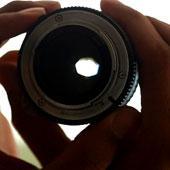
When the intensity of the light falling on the eye increases, the diameter of the pupil is reduced and when the intensity is reduced the diameter of the pupil increases. This is a natural mechanism of the eye to control the light falling on the retina. In a similar fashion the light falling on the image capturing sensor can be controlled in a camera by a comparable mechanism called aperture.

When we increase the diameter of the aperture more light falls on the sensor and when we reduce the aperture lesser light falls on the sensor.

Opening of the aperture is represented by F-number or F-stop number.

Following are the F-stop numbers.
f/1, f/1.4, f/2, f/2.8, f/4, f/5.6, f/8, f/11, f/16, f/22, f/32, f/45, f/64, f/90, f/128

Aperture Settings and Aesthetic effect

Refer the picture.

The subject is in focus and the blurred background separates it and invites our attention to the person. The magical blur in the background is called Bokeh. The blurriness increases as we open up the aperture.

• Case A:
Here in this photograph below, the focus extends from the front of the face to the back of the head. This distance between point A and B is called depth of field.

The subject in the middle is in focus and the subjects in the front and at the back are not. The picture is taken at an F stop number F 1.4 which gives a very shallow depth of field.


Depth of field at F 1.4

• Case B:
In this picture the subject in the foreground and in the background both are in focus. So the depth of field has increased in this case making both subjects in focus. This picture is taken at a depth of field of F/16 that is at a small aperture which will increase the depth of field.


Depth of field at F16

Hence Aperture helps to control the light entering the camera to achieve a normal exposure. It also helps to change the look of the image aesthetically.

Video


Exposure Aperture and Depth of Field


Credits

Participants:
Documentation and Content by:Krishand R. K. IDC, IIT Bombay

Content Creation and Research Guide:Professor Sudesh Balan, IIT Bombay

Sound Design Editing and Mixing:Shantanu YennemadiNarration:Deepanwita Gosh

Cinematography:Professor Sudesh Balan, IIT Bombay

Storyboard and Screenplay:Krishand R.K

Shooting Assistants:Zulfiya Hamzaki
Shubhangi Salinkar
Manisha Swarnkar

Our Page Suggestion

Suggested Topics

Open Make

Open Source DIY Designs
by
Prof. P. Kumaresan
IDC, IIT Bombay

Ek Type

Type Design Studio
by
Ek Type Team
Mumbai, India

Information Design Lab

Information Visualisation Platform
by
Prof. Venkatesh Rajamanickam
IDC, IIT Bombay

Swarachakra

Text Input Tool for Indic Scripts
by
Prof. Anirudha Joshi
IDC, IIT Bombay

D’source

Creating Digital-learning Environment for Design


  • D'source
  • Courses
  • Resources
  • Case study
  • Showcase
  • Gallery
  • Videos
  • Animation Design
  • Communication Design
  • Design Fundamentals
  • Interaction Design
  • Product Design
  • Tools for Design
  • Open Design
  • About
  • People
  • Events
  • Contact Us
  • Download App
  • YouTube
  • Facebook
  • Twitter